
Controller Interface
The controller interface went through many interations. It is written in c# using Microsoft Visual Studio.
The image below shows the interface at December 2025. It has the ability to control four trains, points and the sound effects from each train. It can operate in several modes because it has the additional abitity to know when trains pass one of the Hall Probe sensors. The image shows the location of these sensors marked in orange. The modes to move the trains are:
1. Just drive
2. Random – which takes the train automatically on a random walk around the track
3. Tour – where you set up a predefined tour
The slate Diesel and Blanche have their own routes which can be chosen from a combo box labelled “Slate Mine Transport” near the right of the interface.
There are ‘from’ and ‘to’ points marked with blue or green triangles. These are located at important points on the track layout as reference when describing tours.
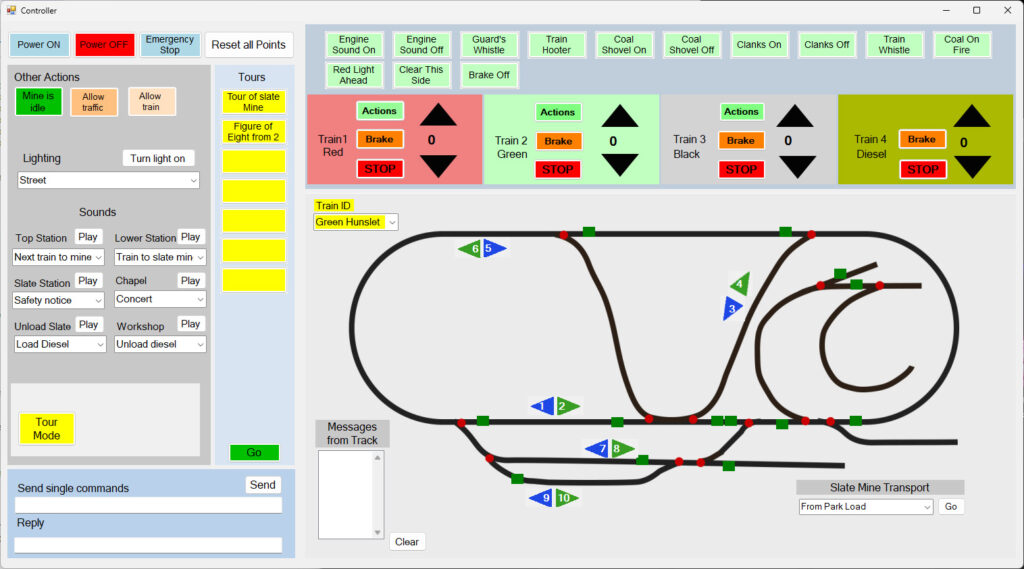
In addition the interface can contol:
a) Sounds: the sound output to the chapel, the slate mine, the upper station and the lower station.
b) Lighting: Lights can be switched on/off to various parts of the village.
c) Incline: The incline operation can be started and stopped. The action always stops when the truck is in the shed at the bottom.
d) Level Crossing: The gate can be opened and closed from the appropriate buttons.
The interface also reports messages from the Hall probes in the track.
It is possible to send single DCC messages to the track, or to a small section of programming track to alter the configuration of a train’s decoder.