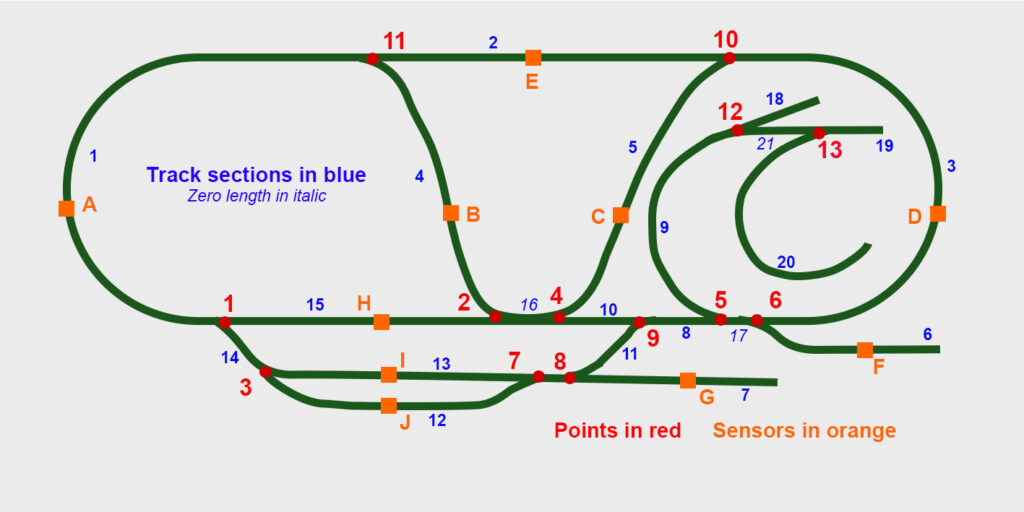
The points and Hall probes are clearly the key in any automation. It is necessary to know where a train is and so the computer can control the setting of any points that lie ahead.
This shows numbering not shown on the general computer interface. The track sections between eack pair of points are numbered. These numbers are shown in blue. From the control point of view each point is given a number (in red). Each Hall sensor is given a letter shown in orange.
As an example think of a train moving from point 11 towards point 1. Suppose it wants to get to track section 5 heading towards point 10. (This is where the slate station is). When the train passes sensor A, the program can make sure that points, 1, 2 and 4 are set correctly to take the train to the Slate station. When it gets to sensor 5 instruction can be given to stop the train.
Using this idea we created the idea of “tours” where a text file provides a series of DCC instructions which are executed when a train passes particular sensors.
Similarly the “routes”have been defined that enable trains to move between points defined by clicking icons near track positions on the main computer interface screen